Build your input setup with help from AI. Review changes on the desk. Keep monitor sends in balance. And when the show calls for more, take your scene programming further.
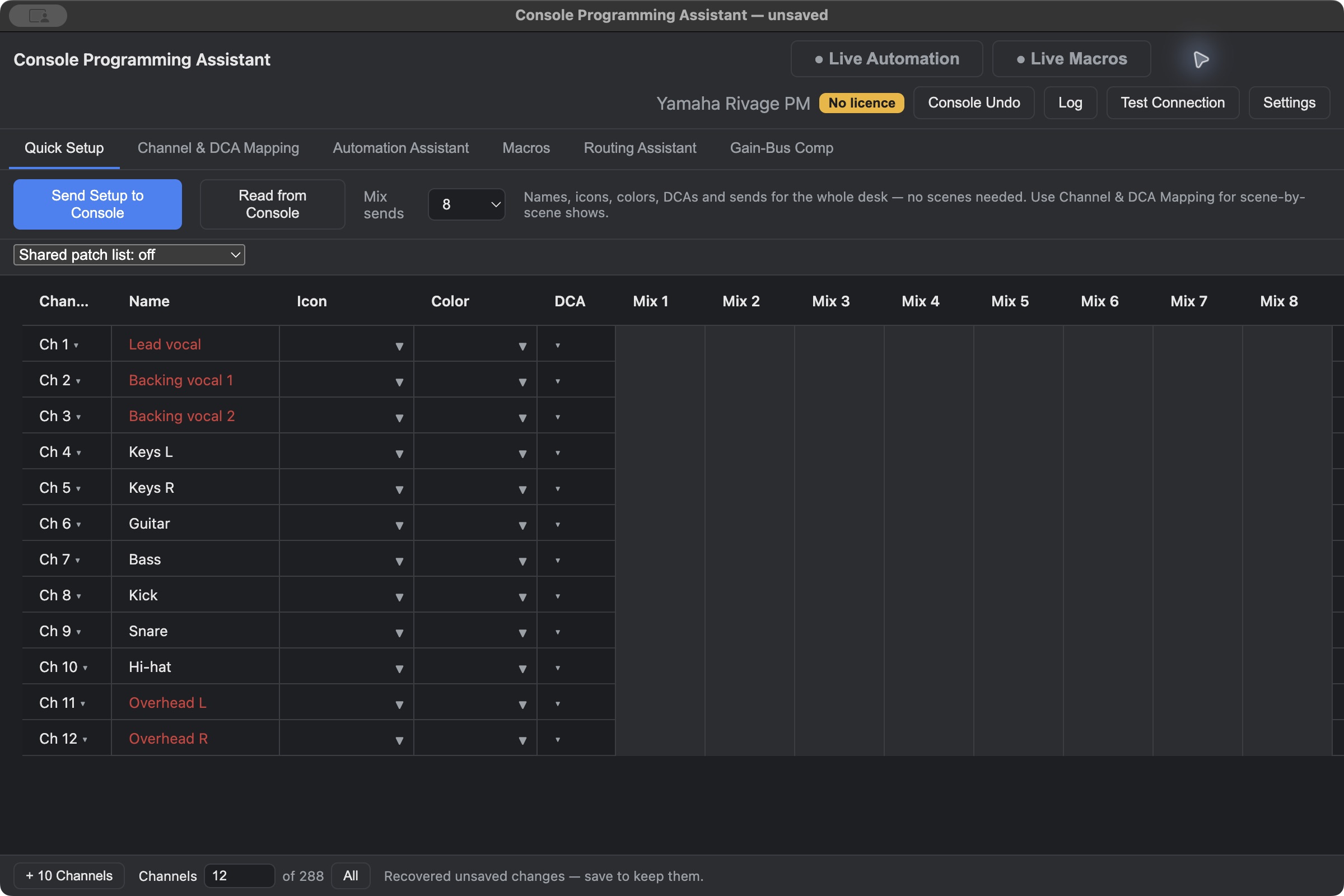
Quick Setup · Actual app, fictional demo show.Console disconnected · Select image to enlarge ↗
BUILD THE SETUPReview the changes. Keep the mix yours.EXTEND THE SHOW
01 / AT THE DESK
A head start. And room to change your mind.
Tools for the work around the mix, whether you’re setting up a band, checking a desk, or preparing the next rehearsal.
01
Quick Setup. With a little help from AI.
Prepare channel names, icons, colors, DCA assignments, and mix sends in one table. Work with a compatible AI assistant to help build and edit your setup, then review it before sending supported settings to the desk.
YOUR INPUT LIST → YOUR CONSOLE02
Console Undo. See what changed. Go back.
Review the console changes the app has tracked and restore earlier values. It’s a history you can inspect before committing a revert, with coverage that depends on the desk and parameter.
TRACKED CHANGES · SELECTIVE RESTORE03
Gain-Bus Compensation. Ride gain. Hold the sends.
When input gain changes, compensate selected mix or matrix sends in the opposite direction to help maintain their levels. Choose which sends to hold on each channel, within the console’s available range.
INPUT GAIN CHANGES → SEND COMPENSATION
Console features and parameter coverage vary by family and validation status. AI integrations use your own AI account; review its suggestions before sending to hardware.
02 / FOR THEATRE
Think in performers. Build in scenes.
From the first script read to a change in rehearsal, keep the show’s structure connected to the desk.
Break down who’s in each scene, plan DCA assignments, and organize scene-by-scene channel settings. Map the show to the physical channels and DCAs you want to use.
02 /
Automation Assistant
Enhance the scene automation your console already provides. Add supported parameter changes, waits, fades, and Live Libraries alongside the desk’s own recalls.
03 /
Keep the decisions in your hands
Choose what stays manual and what the app automates. Capture and edit supported console values, then follow console scene recalls or advance from the app.
Every console family starts in beta and graduates separately. Hardware testing on one desk does not mean every feature is verified.
Hardware-tested workflows First hardware validation pending Early development
Console development status
CONSOLE FAMILY
DEVELOPMENT STAGE
RELEASE STATUS
Yamaha Rivage PM
Hardware-tested workflows
Beta
Yamaha DM7
Hardware-tested workflows
Beta
Allen & Heath dLive
Hardware-tested workflows
Beta
Yamaha DM5
First hardware validation pending
Beta development
Allen & Heath Avantis
First hardware validation pending
Beta development
Allen & Heath SQ
First hardware validation pending
Beta development
Yamaha CL / QL
Early development
Beta development
Yamaha DM3
Early development
Beta development
Status reflects project testing as of October 24, 2026. Beta access is coordinated per family. Test on a rehearsal desk before considering use in a performance.
04 / LICENSING
Start with the show. Choose your console later.
The licensing model is planned. Final prices and checkout will be published before paid sales open.
PREPARATION
Free to plan.
Script breakdown, DCA planning, and spreadsheet import/export stay free. Prepare a show before connecting to hardware.
CONSOLE CONTROL / AT LAUNCH
One feature set. Priced by desk family.
Rent toward ownership of a major version, buy outright, or choose a yearly subscription including major upgrades.
Seven-day full trial planned, once per computer. Internet needed to start the trial; signed licence keys support offline use.
05 / BUILD IT WITH US
Your desk. Your workflow. Help shape what’s next.
Tell us which console you work with. We’ll use your details to follow up about beta testing for that family.
Mac first
Public downloads aren’t available yet. Windows will follow after Mac testing.
A FEW THINGS TO KNOW
Before the first cue.
Does this replace the console?
No. Console Programming Assistant helps prepare and control supported parts of your desk. The engineer remains responsible for the mix, console configuration, and rehearsal testing.
Can I prepare a show without a desk connected?
Yes. Planning is designed to work offline, and the planning features stay free. Connecting to a desk is the paid part of the planned licensing model.
Does the whole app leave beta at once?
No. Each console family has its own beta period, including families added later. A family only becomes supported after its own validation and readiness decision.
Can I use my own AI assistant?
The app includes integrations for compatible desktop AI assistants, plus a copy-and-paste workflow. You use your own AI account. Review imported show data before sending anything to a console.
Where can I download the Mac beta?
Public downloads are not open yet. Submit a beta request above so we can coordinate testing for your console and share the appropriate build when ready.